
Appearance
Liatir API packages
The Liatir API ships in two related packages:
@liatir/apifor Node.liaplugin authoring;liatirfor browser/webview code that needs thewindow.Liatirbridge.
Most plugin authors use @liatir/api through projects created by liatir init.
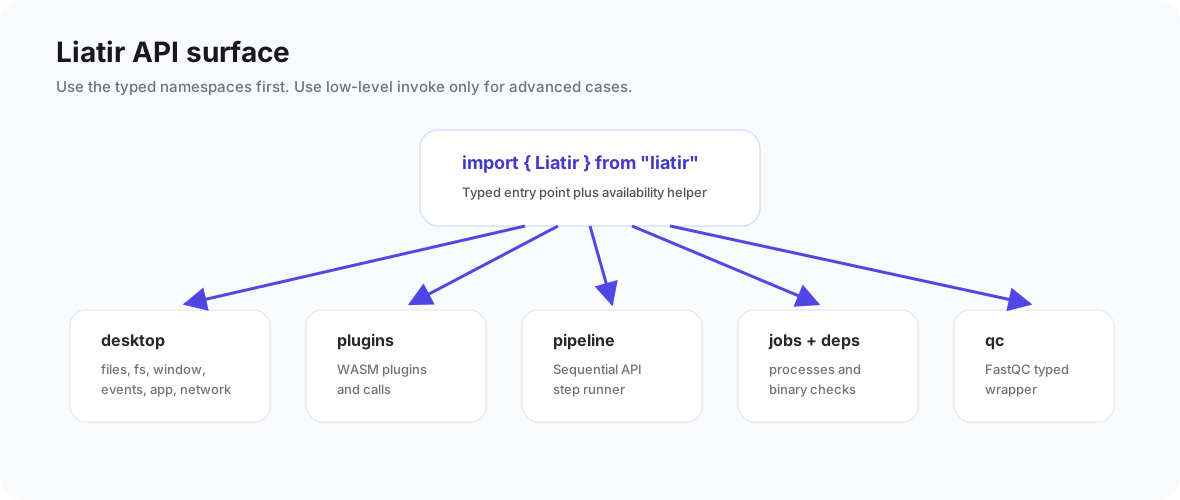
Node plugin authoring
Node .lia plugins import definePlugin, field, and optional helper types from @liatir/api.
ts
import { definePlugin, field, type PluginContext } from "@liatir/api";

const liatirPlugin = definePlugin({
  inputs: {
    text: field.string({
      label: "Text",
      description: "Text to analyze.",
      required: true,
      default: "hello from Liatir",
    }),
  },
  outputs: {
    length: field.number({
      label: "Length",
      description: "Number of characters in the input text.",
      format: "integer",
    }),
  },
});

export default liatirPlugin.main(async ({ input, Liatir }: PluginContext<typeof liatirPlugin>) => {
  return {
    length: input.text.length,
  };
});
The schema is declared once. TypeScript input and output types are inferred from that schema, and liatir build generates the .lia manifest from it.
Node plugin bridge
Inside .main(...), the lia object is a Node bridge to the running Liatir app. It is not the same type as window.Liatir, because a headless Node process does not support GUI-only APIs.
Available areas include:
Liatir.jobsLiatir.depsLiatir.desktop.fsLiatir.desktop.filesLiatir.desktop.eventsLiatir.desktop.appLiatir.desktop.networkLiatir.desktop.clipboardLiatir.desktop.notificationsLiatir.desktop.diagnosticsLiatir.desktop.globalVariablesLiatir.alignLiatir.qcLiatir.variantsLiatir.pluginsLiatir.sidecarLiatir.paths()Liatir.invoke
Browser/webview bridge
Code running inside Liatir's desktop webview can use the browser bridge:
ts
import { Liatir, isLiatirAvailable } from "liatir";

if (isLiatirAvailable()) {
  await Liatir.desktop.files.open({ multi: false });
}
This package proxies the window.Liatir surface. It includes desktop/webview APIs such as window controls, menus, shortcuts, and other UI-related areas that are not available to headless Node plugin code.