
Appearance
Local AI for bioinformatics
This guide explains the AI part of Liatir without assuming that you already know single-cell analysis, genomic language models, regulatory prediction, or protein structure prediction.
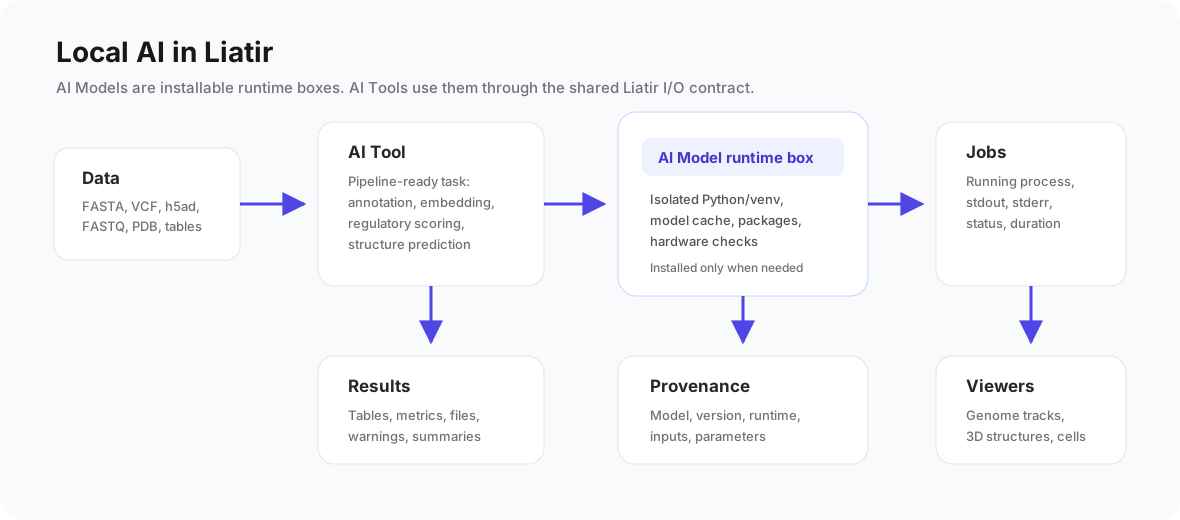
Liatir uses AI locally. That means model runtimes are installed on your machine, your input files stay on your machine, and runs are recorded in Jobs, Results, and provenance just like other tools.
The three pieces
AI Models
An AI Model is the local runtime box: Python environment, packages, model cache, downloaded weights, hardware checks, and model metadata.
Examples:
- CellTypist Local Annotation.
- Nucleotide Transformer v2 50M or 500M.
- ESM-2 8M Protein.
- Enformer, Basenji2, or Borzoi Mini.
- Boltz-2.
AI Tools
An AI Tool is the actual task you run. It asks you for files and settings, then uses a compatible AI Model.
Examples:
- CellTypist Annotation uses the CellTypist AI Model.
- Sequence Embedding can use Nucleotide Transformer or ESM-2.
- Genomic Variant Effect uses Nucleotide Transformer models.
- Regulatory Prediction uses Enformer, Basenji2, or Borzoi Mini.
- Protein Structure Prediction uses Boltz-2.
Results
Results are the output of one run. They can include:
- readable tables and metrics;
- CSV and JSON files;
- embeddings;
- BED genome tracks;
- PDB or mmCIF protein structures;
- warnings;
- logs;
- provenance.
Provenance is important. It tells you which model, version, runtime, input files, parameters, and output files were used.
What each AI workflow is for
| Workflow | Use it when | Typical input | Typical output |
|---|---|---|---|
| Single-cell annotation | You have cells and want likely cell-type labels | .h5ad AnnData | labels, label counts, summary |
| Sequence embedding | You want a numeric representation of DNA, RNA, or protein sequences | FASTA or pasted sequence | embedding table, dimensions, summary |
| Variant effect scoring | You want a first local signal for which variants change sequence representation | FASTA + VCF/VCF.GZ | scores, BED track, warnings |
| Regulatory prediction | You want predicted genomic signal tracks from DNA sequence windows | FASTA or pasted DNA, optional VCF | signal track, variant deltas |
| Protein structure prediction | You want a predicted 3D protein structure | protein FASTA or sequence | mmCIF/PDB, confidence, optional binding outputs |
How to read results
Labels
Labels are categories predicted by a model. For example, CellTypist may label cells as T cells, B cells, monocytes, or other cell types.
High confidence does not mean the label is biologically final. It means the model found a strong match according to its reference. If your tissue, species, assay, or preprocessing differs from the model reference, labels can be wrong.
Embeddings
An embedding is a vector: a list of numbers that represents a biological input.
You usually do not read every number manually. You use embeddings to compare, cluster, visualize, or feed another tool. Similar embeddings often mean similar model representations, not guaranteed biological identity.
Variant effect scores
Liatir's current Nucleotide Transformer variant score compares the embedding of the reference sequence window with the embedding of the alternate sequence window.
The score is useful for prioritization and exploration. It is not a clinical pathogenicity label. A higher score means the model representation changed more, not automatically that the variant is harmful.
Regulatory tracks
Regulatory prediction models output signal across bins in a sequence window. Liatir writes those signals as CSV and BED so they can be inspected as genome tracks.
The targetIndex selects which model output track to inspect. Start with index 0 for a basic test. For serious interpretation, you need to know what the target represents.
Protein structures
Protein structure tools produce a 3D structure file. Confidence and binding values help you judge whether the run looks plausible, but predicted structures still need scientific review.
If a run completes without a structure file, Liatir treats that as a failed scientific output.
Good first tests
Start small:
- Install CellTypist and run a small
.h5addemo. - Install Nucleotide Transformer 50M and run Sequence Embedding on a short FASTA.
- Run Genomic Variant Effect on the demo FASTA and VCF.
- Install one regulatory model and run Regulatory Prediction with
targetIndex = 0and a lowmaxVariants. - Run Boltz-2 on a short protein sequence and inspect the generated structure.
Avoid starting with large files, many variants, or high sample counts until you know the workflow is healthy.
Building useful pipelines
Single-cell
Use:
- AnnData
.h5adinput. - CellTypist Annotation.
- Results table or single-cell preview.
- Later, foundation-model embeddings and Vitessce viewers.
Genomic variants
Use:
- Reference FASTA.
- Variant VCF or VCF.GZ.
- Genomic Variant Effect or Regulatory Prediction.
- BED track output.
- Genome viewer.
Protein structure
Use:
- Protein FASTA or pasted sequence.
- Protein Structure Prediction with Boltz-2.
- 3D viewer.
- Report or exported structure file.
Red flags
Be careful when:
- the input file format is not the one the tool expects;
- a single-cell matrix is raw counts when the model expects normalized data;
- VCF
REFbases do not match the selected FASTA; - a regulatory model uses an unknown
targetIndex; - CPU runtime takes much longer than expected;
- a result has warnings that you have not read;
- provenance does not match the model or input you intended to run.