
How Liatir Works
Liatir is a local-first desktop environment for bioinformatics. It gives you one place to manage data files, run tools, build pipelines, install local AI Models, and review results without sending your scientific data to a cloud service.
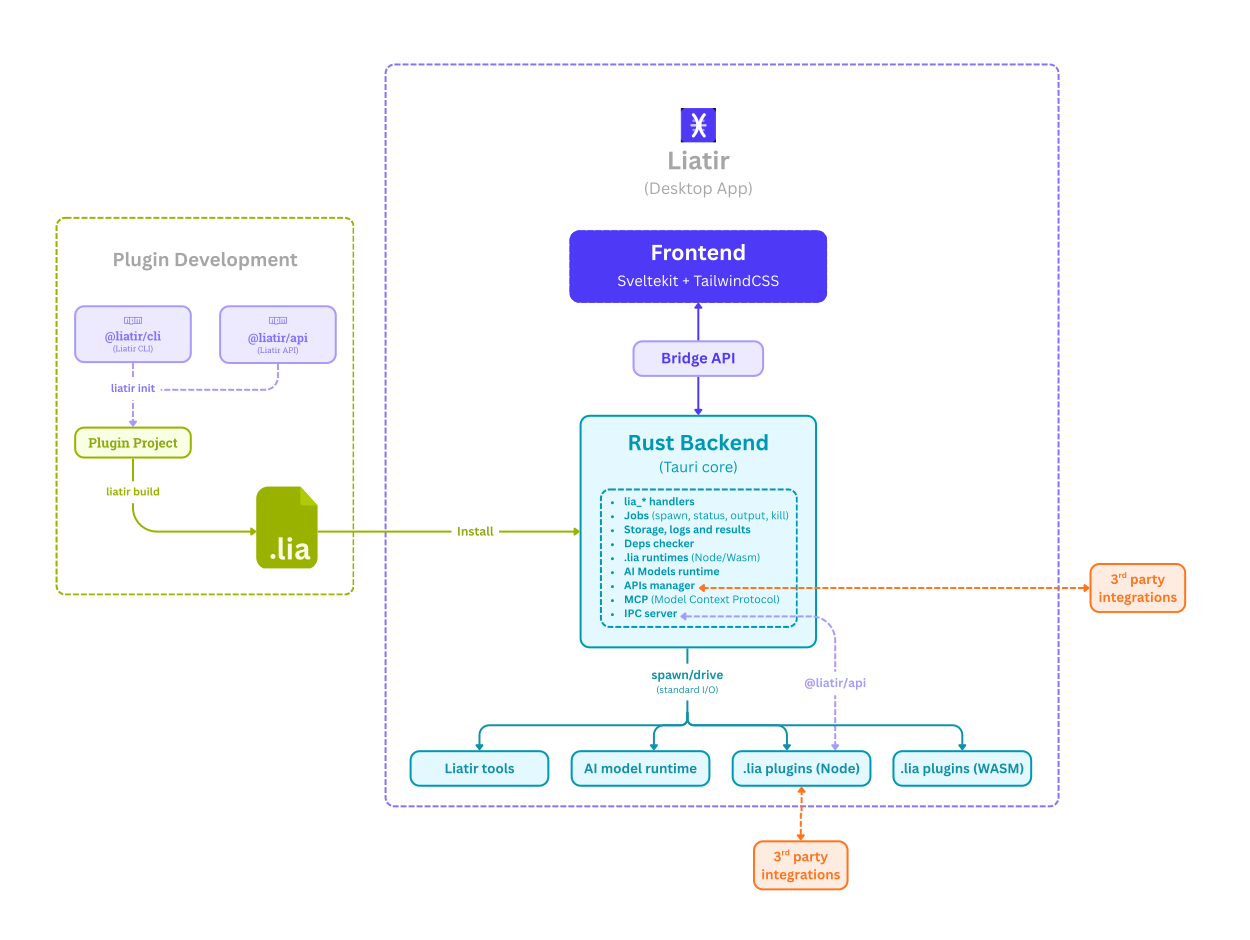
The basic idea
Liatir is organized around a few product concepts:
| Concept | What it means for you |
|---|---|
| Workspaces | Separate projects, demo areas, or experiments. |
| Data | Files you add by path, such as FASTQ, FASTA, BAM, VCF, BED, GFF, or .h5ad. |
| Tools | Built-in analysis steps such as FastQC, fastp, Samtools, BCFtools, and SnpEff. |
| Plugins | .lia extensions that add custom analysis steps. |
| AI Models | Local model runtimes that Liatir can install and manage when you need them. |
| Pipelines | Visual workflows that connect tool outputs to later inputs. |
| Jobs | Long-running work currently executing in the background. |
| Results | Completed runs, logs, output files, metrics, and provenance. |
Local-first by design
When you add a file to Liatir, the app tracks the file path instead of uploading or copying the file into a remote service. Tools run on your machine, and output files are written back to local storage.
This is useful when you work with:
- large genomic files;
- patient or institutionally restricted data;
- offline or air-gapped machines;
- workflows that should remain reproducible on local hardware.
How runs are tracked
Every run should leave a clear trace:
- which tool ran;
- which files or values were used as inputs;
- which parameters were selected;
- which output files were created;
- logs and errors, when relevant;
- provenance that explains how the result was produced.
This is why long-running work appears in Jobs while it is active and in Results after it finishes.
Plugins and extension points
If Liatir does not include a workflow you need, a .lia plugin can add it. A plugin behaves like a normal analysis step in the UI and in pipelines.
Plugin development is documented in the Plugins section. That is the right place for extension-specific code and bundle details.
Dependencties
Bioinformatics workflows can depend on external tools, Python runtimes, model weights, GPUs, and large local files. Liatir tries to make those dependencies visible instead of hiding them behind a black box.
Before running heavier workflows, check the model or tool page for installation, hardware, and license notes.